No subscriptions. One-time hardware purchase. You own the data.

Keep useful information close when the internet is not.

We prepare small Project NOMAD boxes that keep maps, manuals, lessons, emergency references, and your own documents available on-site. Nearby phones, tablets, and laptops can open the library locally, even without reliable internet.

Buy the hardware and setup once. The loaded content stays on the appliance you control, with no required monthly subscription from us.

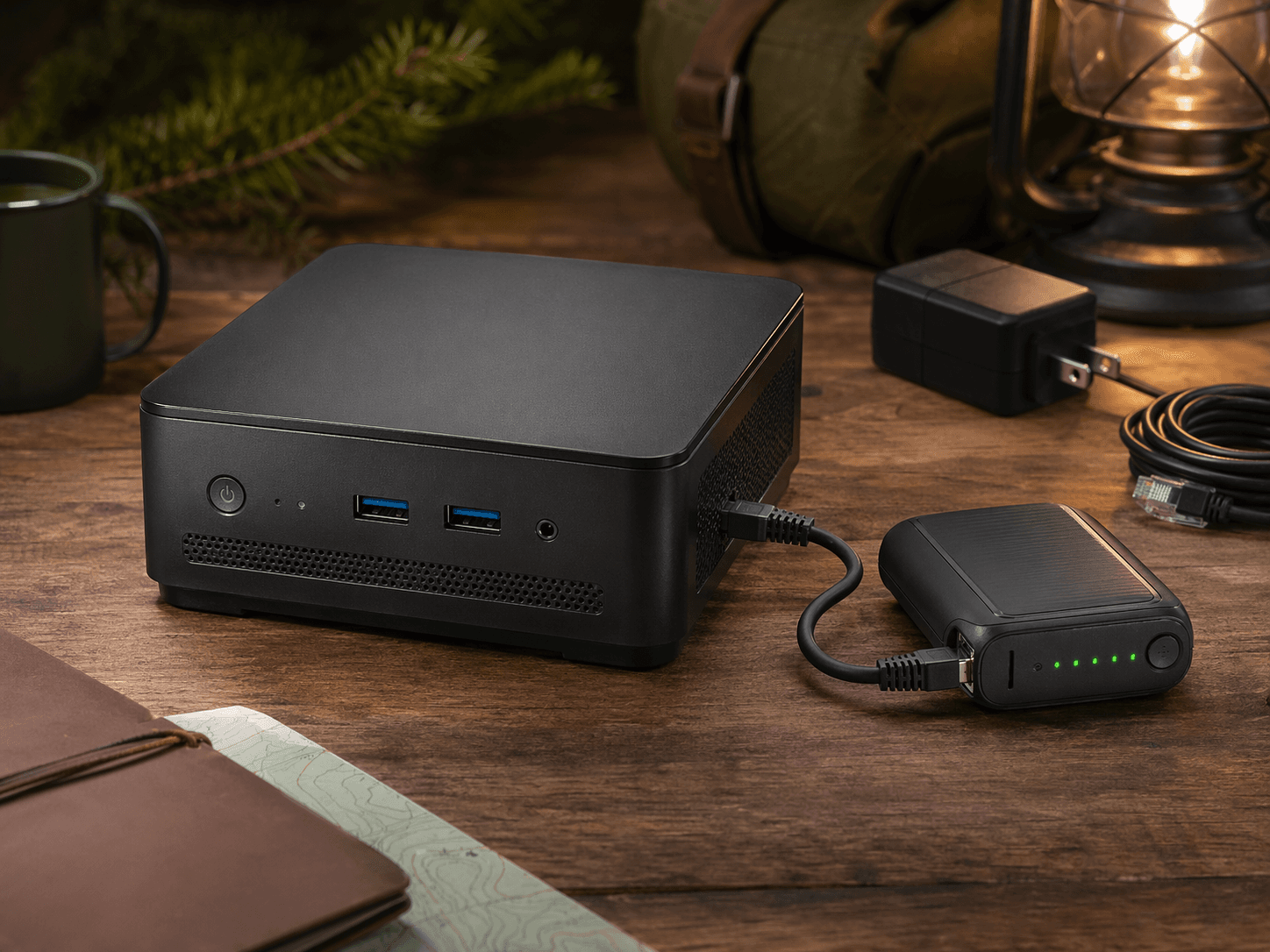
Mini PC appliance with portable router for offline local access

A local library in a small box

Use it at home, in a cabin, in a classroom, or anywhere a dependable connection is not guaranteed.

Why it matters

The best information is only useful if you can actually reach it.

Storms, weak rural service, crowded networks, remote job sites, and travel can all make online tools unreliable. NOMAD keeps important information nearby so people can keep learning, fixing, planning, and working.

Keep practical references available at home, school, church, or a remote site

Use loaded content without depending on cell service or home internet

Store your own manuals, plans, curriculum, and documents locally

Avoid a required monthly subscription for the prepared appliance

What it looks like

Choose the kit that fits the place it will be used

Some buyers want the smallest practical box. Others want a portable Wi-Fi setup for a cabin, classroom, field table, or emergency kit. We keep the choices straightforward.

Project NOMAD kit with a mini PC and portable router

Simple home or cabin box

A small computer loaded with useful references, manuals, maps, lessons, and documents for local use.

Offline Wi-Fi kit

A NOMAD box plus a portable router, so nearby devices can connect even when there is no home network.

Use your own computer

Send a compatible laptop or desktop and we can turn it into a dedicated offline reference box.

Options

Simple setup paths

Quote ranges include the computer, setup work, testing, printed setup help, and 1 year of product support. Bring-your-own-hardware installs are $125 when the laptop or desktop is compatible. Final prices depend on current hardware, storage size, warranty choice, and whether you add the portable router, but there is no required monthly subscription from us.

Bring Your Own Hardware

$125 installation service

Customer provides the laptop or desktop. Hardware must meet the minimum requirements below.

A low-cost setup path if you already have a laptop or desktop that can become a dedicated offline library box.

Best for: Reusing a working computer you already own

  • Customer-provided compatible laptop, desktop, or mini PC
  • 16 GB RAM minimum for non-AI use
  • 256 GB SSD minimum; 500 GB or larger recommended for bigger libraries
  • USB boot support and working Ethernet or Wi-Fi
  • Best for simple offline reference use
Contact Us

NOMAD Basic

$560-$630 typical quote range

Refurbished hardware pricing changes with seller inventory and warranty terms.

A small ready-to-use box for cabins, emergency kits, field trucks, classrooms, and starter offline libraries.

Best for: Basic home, cabin, or emergency reference use

  • Small refurbished mini PC
  • 16 GB RAM typical
  • 500 GB SSD typical
  • Simple browser access for nearby devices
  • 1 year product support included
Contact Us

Best overall

NOMAD Plus

$750-$999 typical quote range

The range reflects current mini PC availability, storage size, and brand/model selection.

The best fit for families, groups, schools, churches, and work sites that want more room for content and smoother everyday use.

Best for: Most homes, schools, churches, and remote locations

  • Stronger mini PC
  • 32 GB RAM typical
  • 512 GB-1 TB SSD typical
  • More room for larger libraries
  • 1 year product support included
Contact Us

NOMAD Pro

$1,750-$2,200 typical quote range

Premium builds vary most because GPU, storage, and compact high-performance hardware availability changes quickly.

A larger, faster setup for serious document libraries, group use, research, or work sites that need more storage and headroom.

Best for: Large libraries, teams, research, and heavy field use

  • Premium small computer
  • 32-64 GB RAM options
  • 1-2 TB SSD options
  • More speed and storage headroom
  • 1 year product support included
Contact Us
Illustration of a NOMAD box and portable router

How it works

Power it on. Connect nearby. Open your local library.

01

Pick a box or send us a compatible computer you already own.

02

We install Project NOMAD and load the offline resources you need.

03

We test it, pack it, and include a simple printed connection guide.

04

You power it on and connect nearby phones, tablets, or laptops.

What is included

Recognizable resources, ready to open offline

A NOMAD box can include familiar libraries and learning tools like Wikipedia, TED Talks, medical references, Project Gutenberg, Khan Academy, maps, practical guides, and documents you provide.

Kiwix

Wikipedia

A familiar encyclopedia-style reference library available locally from nearby devices.

Offline video

TED Talks

Educational talks and videos can be loaded for learning, training, and group viewing without streaming.

Kiwix

Medical References

Useful first-aid, medical, and emergency references for situations where online search is not available.

Kiwix

Project Gutenberg

Classic books and public-domain reading material for education, research, and general reference.

Kolibri

Khan Academy

Lessons, videos, and practice material for students and families who need learning resources offline.

OpenStreetMap

Offline Maps

Map regions can be prepared for route planning, local awareness, and field use without a live connection.

Kiwix

Practical Guides

Repair, survival, gardening, homesteading, and how-to material can be added based on the use case.

Local storage

Your Documents

Manuals, SOPs, emergency plans, curriculum, training packets, and private documents can stay on your box.

Common uses

Useful in everyday places, not just emergencies

The right setup depends on where the box will live and who needs to use it. These are the kinds of situations we prepare for.

Emergency readiness

When storms, fires, or outages knock networks offline, the box still gives you local access to the information you planned ahead to keep.

  • First-aid steps, emergency procedures, and field medicine references
  • Water treatment, food storage, shelter, radio, and survival material
  • Local maps, evacuation notes, and your own uploaded plans

Homeschool and education

A local learning library lets students keep working without depending on home internet, hotspots, or crowded public networks.

  • Offline lessons, reference material, and classic books
  • Study help and review tools when supported by the selected box
  • Your curriculum documents kept with the rest of the library

Off-grid living

Remote homes and cabins still need practical knowledge for repairs, gardening, food preservation, and daily problem-solving.

  • DIY repair references and how-to guides
  • Gardening, livestock, and homesteading information
  • Medical, map, and planning resources available on-site

Remote work sites

Construction crews, ranch operations, research stations, mobile teams, and ships can keep technical references nearby when reliable internet is weak or absent.

  • Manuals, standards, SOPs, compliance documents, and proprietary site references
  • Training resources for crews and rotating workers
  • Local document search and summaries when supported by the selected box

Travel and expedition use

For overland trips, remote travel, and long stretches away from reliable service, the appliance becomes a portable reference station.

  • Maps and destination information without roaming dependence
  • Health references, cultural background, and field guides
  • Plant, animal, and geography reference material kept local

Private local research

Some buyers want their questions, notes, and documents to stay on their own hardware.

  • Search and read locally instead of through ad-driven platforms
  • Keep uploaded manuals, notes, sensitive documents, and proprietary information on your own hardware
  • Use optional local help for document questions when supported by the selected box

Portable Wi-Fi option

Create a small local network almost anywhere

The portable router option helps phones, tablets, and laptops connect to the NOMAD box when there is no home router nearby.

  • Portable travel router bundle
  • Local Wi-Fi setup
  • Burn-in testing
  • Printed quick-start guide
  • Remote onboarding and support
  • Extended support plan
Illustration of a portable router bundle

About Project NOMAD

Built around open-source Project NOMAD

Project NOMAD is a separate open-source project under Apache 2.0. We do not own it or claim endorsement. Our offer is hardware, setup, testing, documentation, and support for a ready-to-use appliance.

FAQ preview

Common questions

What am I actually buying?

You are buying a ready-to-use offline system: hardware, installation, configuration, testing, documentation, and optional support. You are not buying ownership of Project NOMAD itself.

Is Project NOMAD included?

Project NOMAD is installed and configured on the appliance as open-source software under Apache 2.0. Project NOMAD is a separate open-source project that we do not own. You can view the official Project NOMAD GitHub repository here:

Does it work without internet?

Yes. Once content and tools are loaded, the appliance is meant to work locally without outside internet. That is the point for rural homes, off-grid setups, remote work locations, and emergency scenarios where service may be poor or unavailable.

What content is available with no subscription?

The material loaded onto your appliance stays available locally without a required monthly subscription from us. Depending on the build, that can include offline references, maps, manuals, SOPs, proprietary documents you provide, education tools, and local AI features supported by the selected hardware.

Ready for a practical offline resource box?

Tell us who will use it, where it will live, what content matters, and whether you want the portable router bundle. We will recommend a practical configuration.

Contact Us